Depth-based inspector, sunsetting /tidewave, and more
This is a round up of the features and enhancements we shipped in the last week.
Highlight: depth-based inspector
When using Tidewave's inspector, we often want to select an element that is behind another element, which was not possible since the inspector only focuses on elements at the top. The browser's inspector has similar issues, where our options are either to manually remove the elements at the top or to traverse the complete DOM tree and find the element.
However, there is a better way: a depth-based inspector. Simply right-click any position and Tidewave will open up a contextual menu with all DOM elements at the chosen point! Then you can either use the keyboard or the mouse to select the desired element:
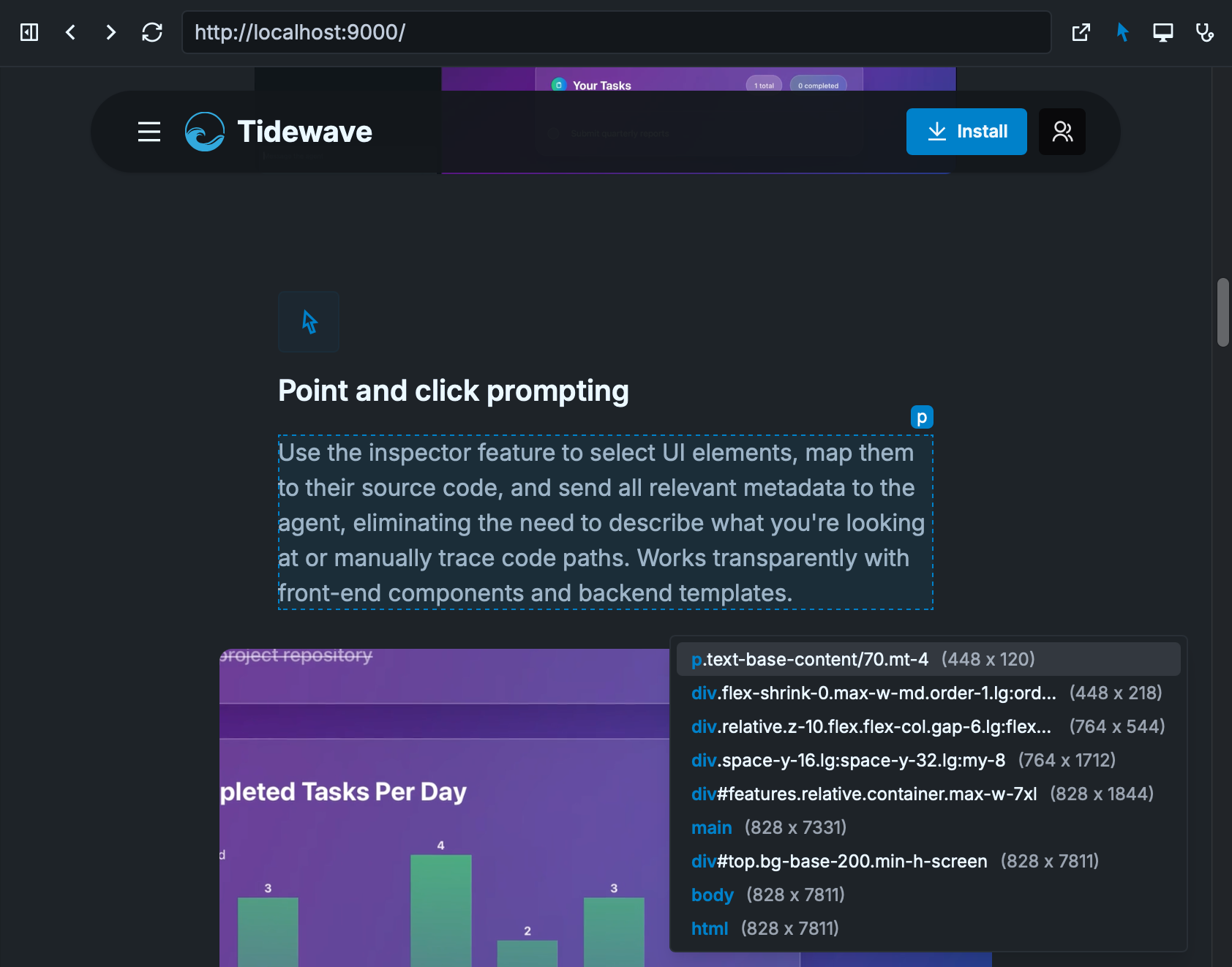
In the screenshot above, after right-clicking the paragraph, a contextual menu appeared on the bottom right, which allows us to navigate all elements at that position. This combines visual selection with DOM traversal, giving you the best of both worlds by traversing only the elements at a specific position, not the entire tree.
Highlight: sunsetting /tidewave
When we first launched Tidewave, the main mechanism to launch our coding agent was by visiting the /tidewave route of your web application. However, as we added more features, this design decision was constraining our ability to improve the product:
-
In order to support Claude Code, Codex, and other agents, we need the ability to manage long running processes, which is not possible to do through your web application (as your web application may restart)
-
If your application used subdomains, Tidewave's configuration was split across each subdomain, requiring you to configure it over and over again
-
Since your application and Tidewave ran in the same origin, it was hard for us to provide meaningful security boundaries for the JavaScript code that run in the page
To address all of these issues, we built the Tidewave app. It offers more features, it is more robust, and it is safer too. As of this release, the /tidewave route will either redirect or point users to install the Tidewave app. If you run into any issues, you can either join our Discord community or reach out to us by email.
If you are using Tidewave MCP, the
/tidewave/mcproute still works. This only affects the parent/tidewaveroute.
Other notable changes
- Allow a default preferred mode to be set
- Update default version of Claude Code and Codex ACP
- Show a tooltip with model information whenever available
- Don't clear editor when starting new chat
- Support
textareawhen usingpage.fillin browser evaluation - [Phoenix] Make paths and links more precise for umbrella Phoenix projects
- [Phoenix] Enable restart for those using Elixir with Erlang/OTP 28.1+